
In partnership with

In partnership with


Looking for unbiased, fact-based news? Join 1440 today.

Join over 4 million Americans who start their day with 1440 – your daily digest for unbiased, fact-centric news. From politics to sports, we cover it all by analyzing over 100 sources. Our concise, 5-minute read lands in your inbox each morning at no cost. Experience news without the noise; let 1440 help you make up your own mind. Sign up now and invite your friends and family to be part of the informed.
🚀 Your Investing Journey Just Got Better: Premium Subscriptions Are Here! 🚀
It’s been 4 months since we launched our premium subscription plans at GuruFinance Insights, and the results have been phenomenal! Now, we’re making it even better for you to take your investing game to the next level. Whether you’re just starting out or you’re a seasoned trader, our updated plans are designed to give you the tools, insights, and support you need to succeed.
Here’s what you’ll get as a premium member:
Exclusive Trading Strategies: Unlock proven methods to maximize your returns.
In-Depth Research Analysis: Stay ahead with insights from the latest market trends.
Ad-Free Experience: Focus on what matters most—your investments.
Monthly AMA Sessions: Get your questions answered by top industry experts.
Coding Tutorials: Learn how to automate your trading strategies like a pro.
Masterclasses & One-on-One Consultations: Elevate your skills with personalized guidance.
Our three tailored plans—Starter Investor, Pro Trader, and Elite Investor—are designed to fit your unique needs and goals. Whether you’re looking for foundational tools or advanced strategies, we’ve got you covered.
Don’t wait any longer to transform your investment strategy. The last 4 months have shown just how powerful these tools can be—now it’s your turn to experience the difference.

Today we will create a simple dashboard which contains information about a stock using Streamlit, Python and yfinance. The dashboard will allow a user to enter a stock ticker and then return a list of important metrics associated with that stock.
This is a relatively straightforward article but feel free to get creative with it and extend to suit your own needs. We will also not be deploying this dashboard today, I will save that for tomorrows article. Stay tuned for that!
The dashboard we are building will look like this:
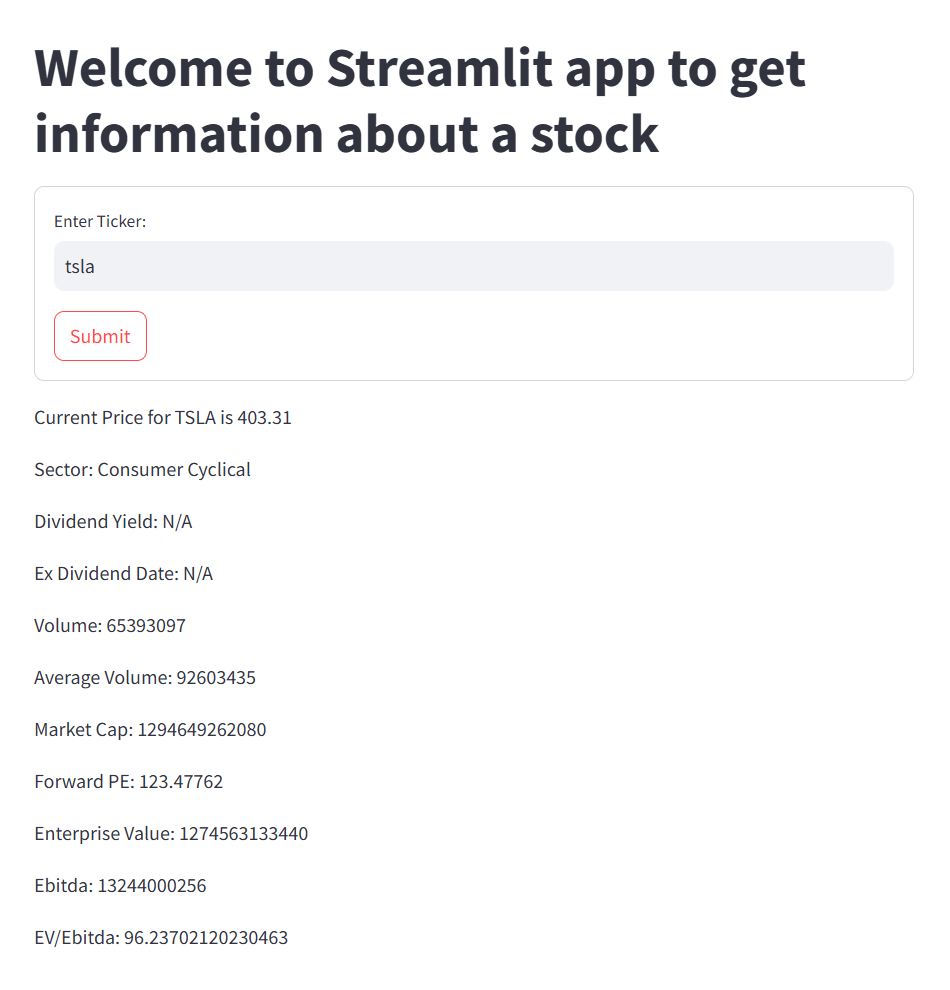
Why Streamlit?
Streamlit is a great framework for delivering data analysis applications to users in only a few lines of code. Its great for quick solutions where devs want to get an mvp up and running quickly, without having to worry about things like complex deployments, hosting, VMs etc.
Streamlit is a great framework for beginners just dipping their toes into data analysis and AI/ML.
With that in mind lets jump into the code.
You Don’t Need to Be Technical. Just Informed

AI isn’t optional anymore—but coding isn’t required.
The AI Report gives business leaders the edge with daily insights, use cases, and implementation guides across ops, sales, and strategy.
Trusted by professionals at Google, OpenAI, and Microsoft.
👉 Get the newsletter and make smarter AI decisions.
Code Walkthrough
As explained, this is a simple solution with the intention of getting you started using streamlit in a non-intimidating way.
Create a new file called app.py in your IDE.
Then install the streamlit package using
pip install streamlitLets import the packages we will be using
import streamlit as st
import pandas as pd
import yfinance as yf
from datetime import date
Create a title for our app and add a form with an input box where the user will enter the ticker and a submit button
st.title('Welcome to Streamlit app to get information about a stock')

with st.form(key='my_form_to_submit'):
    ticker = st.text_input('Enter Ticker:')
    submit_button = st.form_submit_button(label='Submit')
Once the submit button is clicked we then run our code to get the stock information using yfinance. We need to structure the app like this as if we do not include the if statement, streamlit will run our all of our code together and our data will be missing, throwing errors instead!
if submit_button:
    ticker = ticker.upper()
    data = yf.download(ticker, period='5d')
    dataClose = data['Close']
    most_recent_price = dataClose.sort_values('Date', ascending=False).iloc[0][f'{ticker}']
    most_recent_price = str(round(most_recent_price, 2))
    company = yf.Ticker(ticker)
    informationTicker = company.info
    sector = informationTicker['sector']
Next we need some different logic for dividend information as not every company offers dividends. We can set both dividendYield and exDividendDate to “N/A” and use a try except block to update the values if present else we just pass.
    dividendYield = "N/A"
    exDividendDate = "N/A"
    try:
        dividendYield = informationTicker['dividendYield']
        exDividendDate = date.fromtimestamp(informationTicker['exDividendDate'])
    except:
        pass
    volume = informationTicker['volume']
    avgVolume = informationTicker['averageVolume']
    marketCap = informationTicker['marketCap']
    forwardPE = informationTicker['forwardPE']
    enterpriseValue = informationTicker['enterpriseValue']
    ebitda = informationTicker['ebitda']
    EVDividedByEbitda = enterpriseValue / ebitda
Next, write all of our info so the user can see it.
    st.write(f'Current Price for {ticker} is {most_recent_price}')
    st.write(f'Sector: {sector}')
    st.write(f'Dividend Yield: {dividendYield}')
    st.write(f'Ex Dividend Date: {exDividendDate}')
    st.write(f'Volume: {volume}')
    st.write(f'Average Volume: {avgVolume}')
    st.write(f'Market Cap: {marketCap}')
    st.write(f'Forward PE: {forwardPE}')
    st.write(f'Enterprise Value: {enterpriseValue}')
    st.write(f'Ebitda: {ebitda}')
    st.write(f'EV/Ebitda: {EVDividedByEbitda}')
To start the app run the following command and a new window should open in your web browser with the dashboard running!
streamlit run app.pyFeel free to add styling to the dashboard as it is currently quite plain.
Tomorrow we will deploy the application so that you can get your first users!
Conclusion
If you enjoyed this article please consider leaving a clap and following.
Thanks for reading.